
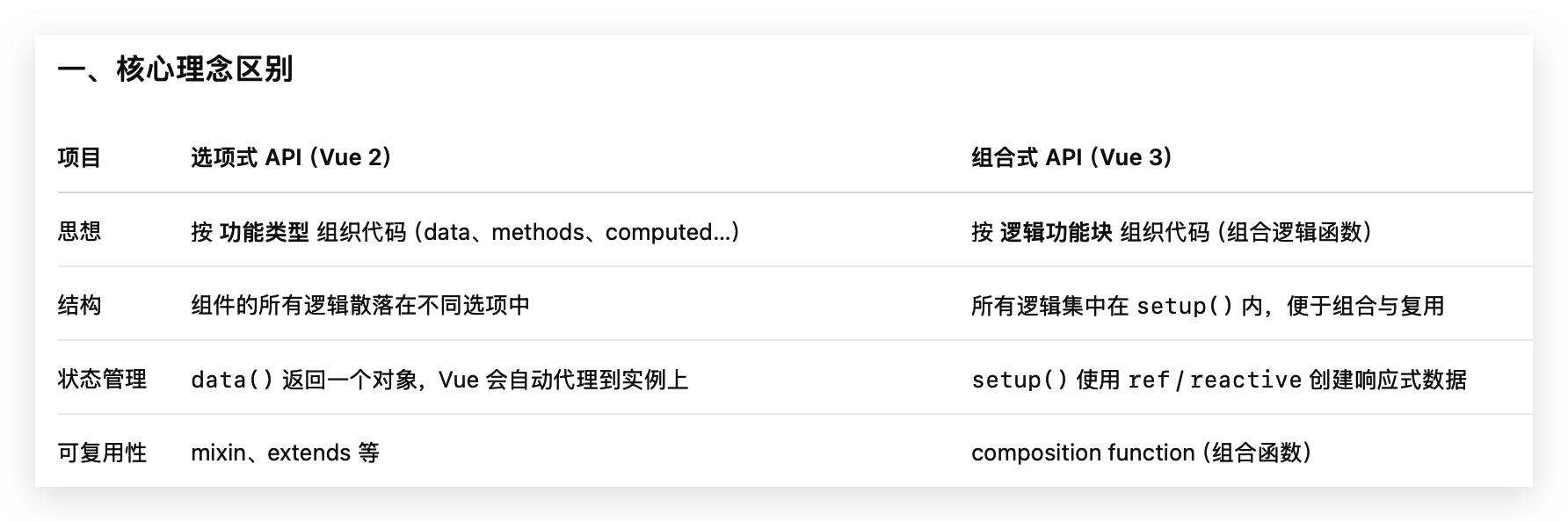
最讨厌 vue 的地方,就是 API 太灵活,并且多变,没有很好的可推导性。使用者的心智模型负担很重,需要记忆很多零碎的语法。所以做个笔记区别一下,总结如下:
- vue2 只支持选项式(Optional) API
- vue3 既支持选项式,也支持组合式(Composition) API
- 是不是组合式 API,区别在于是否有 setup
- defineComponent 是 @vue/runtime-core 是 vue 提供的辅助函数
选项式写法示例 (使用 this):
<script>
export default {
  props: ['count'],
  methods: {
    increment() {
      this.$emit('increment', this.count + 1)
    }
  }
}
</script>
组合式写法 setup 语法糖(不使用 this)
<script setup>
const props = defineProps(['count'])
const emit = defineEmits(['increment'])

const increment = () => {
  emit('increment', props.count + 1)
}
</script>
组合式写法非 setup 语法糖 (不使用 this,使用 setup(props, context) )
<script>
import { defineComponent } from 'vue'

export default defineComponent({
  props: ['count'],
  emits: ['increment'],

  setup(props, { emit }) {
    const increment = () => {
      emit('increment', props.count + 1)
    }

    return { increment }
  },
})
</script>
Vue 3 的 setup 会接收两个参数:
setup(props, context)第二个参数 context 是一个普通对象,包含三个属性:
| 属性 | 含义 | 替代了 Vue 2 的 |
|---|---|---|
| emit | 触发自定义事件 | $emit |
| attrs | 组件接收到但未在 props 中声明的属性 | $attrs |
| slots | 插槽内容 | $slots |
一、各种写法案例,特点
1.1、Optional 选项式 (vue2/3 均支持)
特点:每种逻辑(数据、方法、计算属性)分散在不同选项里。
export default {
  props: {
    msg: String
  },
  data() {
    return {
      count: 0
    }
  },
  computed: {
    double() {
      return this.count * 2
    }
  },
  methods: {
    increment() {
      this.count++
    }
  },
  mounted() {
    console.log('mounted', this.msg)
  }
}
✅ 特征
- 没有 ref()、reactive()、computed() 这些函数式 API,这些只在组合式 API 中可用;
- 所有响应式数据都来自 data();
- 所有计算属性来自 computed;
- 所有方法来自 methods;
- 模板中使用或在代码中访问时,都通过 this,都代理到 this 上。
✅ this.props / this.count / this.double / this.increment()
1.2、非 setup 语法糖的组合式写法
示例:
<template>
  <div>
    <h1>{{ title }}</h1>
    <p>Count: {{ count }}</p>
    <button @click="increment">+1</button>
  </div>
</template>

<script>
import { ref, toRefs } from 'vue'

export default {
  name: 'Counter',
  props: {
    title: String,
    count: {
      type: Number,
      default: 0
    }
  },
  setup(props) {
    // 解构 props 保持响应式
    const { title, count: countProp } = toRefs(props)

    // 本地状态
    const count = ref(countProp.value)

    // 方法
    const increment = () => {
      count.value += 1
    }

    return {
      title,
      count,
      increment
    }
  }
}
</script>
✅ 说明:
- props 是只读的响应式对象
- 使用 toRefs 解构可以保持响应式
- ref 用于本地可变状态
- setup 的最后,需要 return 返回的对象暴露给模板。只有 return 了,才能暴露给 Vue 模版使用。
🔹 特征总结(非 <script setup> 组合式 API)
| 特征 | 说明 |
| props | setup(props) 中接收,默认只读响应式,需要 toRefs 解构保持响应式 |
| 本地状态 | 使用 ref() 或 reactive() 创建 |
| 方法 | 在 setup 内定义并返回 |
| 模板访问 | setup 返回的对象可以直接在模板中使用 |
| 类型支持 | TypeScript 可以推导 props 类型和返回对象类型 |
| 子传父 | setup 的第二个参数 { emit } 用于 $emit |
1.3、defineComponent 既可以写组合式,也可以写选项式,它只是用来类型推断
1.3.1、选项式API,在 TypeScript 项目里,推荐使用 defineComponent
import { defineComponent } from 'vue'

export default defineComponent({
  props: { title: String },
  data() {
    return { count: 0 }
  },
  methods: {
    increment() {
      this.count += 1
    }
  }
})- 选项式 API 运行逻辑不变
- TS 支持更好,可以推导 this.count 和 this.title 类型
1.3.2、组合式API,使用 defineComponent
defineComponent 只是一个 类型辅助函数,主要用于 TypeScript 类型推导,本质上不改变组件的运行机制。
import { defineComponent, ref } from 'vue'

export default defineComponent({
  props: { title: String },
  setup(props) {
    const count = ref(0)
    return { count }
  }
})
1.3.3、总结
| 特性 | defineComponent | 不用 defineComponent |
| 选项式 API | ✅ 可以用,主要是类型推导 | 原生写法 |
| 组合式 API | ✅ 推荐用,TS 类型推导强 | 也能直接 export default {} |
| 运行效果 | 一样 | 一样 |
| 主要作用 | TypeScript 类型推导辅助 | — |
defineComponent 不能和 <script setup>语法糖一起使用:
- <script setup> 本身就是 编译时语法糖
- Vue 编译器会自动对 defineProps、defineEmits、ref 等进行类型推导
- 所以在 <script setup> 中使用 defineComponent 没有意义,也不需要
二、父传子: Props
2.1、Vue2 Optional 选项式中的 Props
export default {
  props: {
    title: String,
    count: Number
  }
}
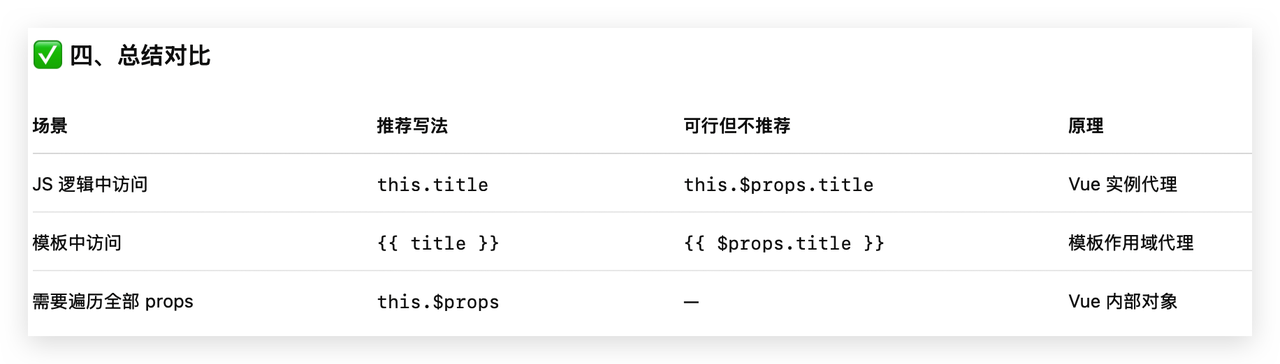
2.1.1、在选项式 API 上,props 会被代理到 this 对象上
this.title  // 实际等价于 this.$props.title
this.count  // 实际等价于 this.$props.count
2.1.2、模版中使用
<h3>{{ title }}</h3>
<p>{{ count }}</p>
也可以在模版中使用 $props.title 但是不推荐
{{ $props.title }}$props 一般用来遍历整个 props
2.1.3、一句话总结 💬
在选项式 API 中,props 的每个字段都会自动变成实例属性,所以直接用 this.xxx 或模板中 {{ xxx }} 就行;
$props.xxx 虽然能用,但只是访问底层对象,一般不推荐。
2.1.4、使用 $attrs 在父→子→孙组件之间传递
一句话总结:$attrs 是父组件传给当前组件、但没有被当前组件声明为 props 的所有属性集合。
它本质上是一个普通对象:
this.$attrs // { class: 'btn', id: 'main', custom: 'xxx' }为什么会有 $attrs
假设你写了一个中间层组件:
<!-- Parent.vue -->
<Child :msg="'hello'" :count="5" :style="{ color: 'red' }" />// Child.vue
export default {
props: ['msg']
}此时:
- msg 被声明为 prop;
- 但 count、style 没有被声明;
- Vue 不会丢掉这些多余属性,而是放进 $attrs 对象中。
结果:
this.$attrs === { count: 5, style: { color: 'red' } }常见用途,多层组件之间传递剩余属性:
你可以用 v-bind="$attrs" 把这些属性继续往下传:
// Child 组件内部
<template>
  <button v-bind="$attrs">{{ msg }}</button>
</template>

<script>
export default {
  props: ['msg']
}
</script>
外层父组件传:
<Child :msg="'Click Me!'" class="red" id="btn1" />实际渲染结果:
<button class="red" id="btn1">Click Me!</button>msg 被 child 内部吃掉了。
2.1.5、使用 inheritAttrs 防止 $attrs 自动加到根元素上
默认情况下,Vue 会自动把 $attrs 绑定到组件模板的根节点上。
<template>
  <div>{{ msg }}</div>
</template>
父组件写:
<Child id="abc" class="red" />默认结果:
<div id="abc" class="red">hello</div>但如果你不想这样,可以禁用:
export default {
  inheritAttrs: false
}
此时 $attrs 不会自动加在根元素上,你需要手动决定往哪传。就是通过 v-bind="$attrs" 手动绑定:
<template>
  <div>
    <button v-bind="$attrs">点击我</button>
  </div>
</template>

<script>
export default {
  inheritAttrs: false, // 禁止自动绑定到根 <div>
}
</script>
父组件:
<MyButton id="ok" class="red" />渲染结果:
<div>
  <button id="ok" class="red">点击我</button>
</div>
2.1.6、Vue2 的 $listener 在 Vue3 上都合并进了 $attrs
vue2 有两个对象:
- $attrs → 非 props 的属性
- $listeners → 所有监听的事件
常用组合:
<BaseButton v-bind="$attrs" v-on="$listeners" />但是在 Vue3 $listeners 被合并进 $attrs,所有事件监听器也包含在 $attrs 里,所以只需 v-on="$attrs":
<BaseButton v-bind="$attrs" v-on="$attrs" />Vue 3 中 $attrs 统一包含「额外属性 + 事件监听器」。
2.2、Vue3 写 Props
🔹 选项式 API 定义 props
export default {
  props: {
    title: String,
    count: {
      type: Number,
      default: 0
    }
  }
}
🔹 组合式 API(非 <script setup>)
export default {
  props: {
    title: String,
    count: {
      type: Number,
      default: 0
    }
  },
  setup(props) {
    console.log(props.title, props.count)
    // props 是只读的
  }
}
可以看到非 setup 语法糖,组合式和选项式在 props 的写法上基本一样。
🔹 <script setup>(语法糖)
<script setup>
defineProps({
  title: String,
  count: { type: Number, default: 0 }
})
</script>
🔹 使用 props
模板中:直接使用变量名,不需要 props.xxx
<h1>{{ title }}</h1>
<p>{{ count }}</p>
JS 中:
- 选项式:this.title、this.count
- 组合式:props.title、props.count(只读)
如果想修改,需要通过 ref 或在父组件中修改。
🔹 响应性丢失:直接 const { title } = props 后,响应性丢失,建议用 toRefs(props)
组合式 API 中 props 是响应式的,只读状态;模板自动解包。但使用 const { title } = props会丢失响应式。建议使用: toRefs(props)
import { toRefs } from 'vue'

export default {
  props: {
    title: String,
    count: Number
  },
  setup(props) {
    const { title, count } = toRefs(props)  // 保持响应式
    return { title, count }
  }
}
✅ 这样 title 和 count 就可以直接在模板中使用,同时保持响应式,不会丢失响应能力。
🔹 <script setup> 语法糖defineProps只读响应式
在 <script setup> 语法糖里,就不会存在解包丢失响应式的问题:
<script setup>
const props = defineProps({ title: String, count: Number })
</script>- props 本身就是 响应式的只读对象;
- 可以直接在模板中用 title、count(自动解包),也可以在 JS 中访问 props.title、props.count;
- 不需要也不能再用 toRefs 解构,因为 <script setup> 会自动处理解包和响应式代理。
总结一句话:
<script setup> 自动解包和保留响应式,所以 toRefs 在语法糖下没必要也不能用。
三 、子传父:emit
子组件通过 $emit 触发事件,父组件通过监听事件来接收数据。
3.1、Opotional Vue2 中的 $emit
子组件(Child.vue)
<template>
  <button @click="$emit('increment', 2)">加2</button>
</template>
父组件(Parent.vue)
<template>
  <div>
    <Child @increment="count += $event" />
    <p>{{ count }}</p>
  </div>
</template>

<script>
import Child from './Child.vue'

export default {
  components: { Child },
  data: () => ({ count: 0 })
}
</script>
$event 是 Vue 模板语法内置变量,在监听事件时,用来接收事件回调的参数。
📘 来源:子组件通过 $emit('事件名', 参数) 触发时,这个“参数”就自动传递给 $event。
还可以通过封装成方法的方式处理,更加易读一些:
<template>
  <div>
    <Child @increment="handleIncrement" />
    <p>{{ count }}</p>
  </div>
</template>

<script>
import Child from './Child.vue'
export default {
  components: { Child },
  data: () => ({ count: 0 }),
  methods: {
    handleIncrement(value) {
      this.count += value
    }
  }
}
</script>
这里的 value 参数就是 $event 的值。
@increment="handleIncrement" 等价于 @increment="handleIncrement($event)"。
3.2、Vue3 中的 emit
Vue 3 里 $event 仍然存在,完全兼容。
🔹子组件
<script setup>
const emit = defineEmits(['increment'])
</script>

<template>
  <button @click="emit('increment', 2)">+2</button>
</template>
🔹父组件
<template>
  <!-- 内联 -->
  <Child @increment="count += $event" />

  <!-- 或函数 -->
  <Child @increment="handleIncrement" />
  <p>{{ count }}</p>
</template>

<script setup>
import { ref } from 'vue'
import Child from './Child.vue'

const count = ref(0)
const handleIncrement = (value) => {
  count.value += value
}
</script>
3和2的写法几乎一致。
3.3、不使用 setup 语法糖的组合式 API 写法
🔹 子组件(Child.vue)
<template>
  <button @click="increment">+2</button>
</template>

<script>
export default {
  name: 'Child',
  // 组合式 API
  setup(props, { emit }) {
    const increment = () => {
      emit('increment', 2)  // 子组件触发事件并传值
    }

    return { increment }
  }
}
</script>
🔹 父组件(Parent.vue)
<template>
  <div>
    <!-- 内联使用 $event -->
    <Child @increment="count += $event" />

    <!-- 或使用方法 -->
    <Child @increment="handleIncrement" />

    <p>{{ count }}</p>
  </div>
</template>

<script>
import { ref } from 'vue'
import Child from './Child.vue'

export default {
  components: { Child },
  setup() {
    const count = ref(0)

    // 用方法接收子组件事件
    const handleIncrement = (value) => {
      count.value += value
    }

    return { count, handleIncrement }
  }
}
</script>
四、defineProps 和 defineEmits 的泛型形式
在 <script setup> 中,defineProps 和 defineEmits 是编译宏(compile-time macro),它们在编译时被擦除。此外,ts 中,这两个宏可以辅助类型推导。
这两个宏,有两种写法,泛型形式和非泛型形式。
非泛型形式
直接传入一个对象(defineProps)或者数组(defineEmits):
const props = defineProps({
  title: String,
  count: {
    type: Number,
    default: 0
  }
})

const emit = defineEmits(['update', 'delete'])
这种写法不是很强调类型,偏向灵活,运行时灵活。
泛型形式
直接传入 TypeScript 类型参数:
interface Props {
  title: string
  count?: number
}

const props = defineProps<Props>()

const emit = defineEmits<{
  (event: 'update', value: number): void
  (event: 'delete'): void
}>()
有完整的编译器类型约束,类型推导最强。
为什么 defineEmits 不是泛型数组了?
如果写成这样:
defineEmits<['update', 'delete']>()这只是字面量类型 'update' | 'delete' 的联合,表达不了参数类型。
你不能写出:
emit('update', 123) // 不知道 123 是啥所以 Vue 团队干脆选用了这种语法:
defineEmits<{
  (event: 'update', value: number): void
  (event: 'delete'): void
}>()
这里每一行都是一个“重载函数签名”:例如 update,必须带 number 参数。这样类型系统就可以进行类型约束和推导了。
混合用法
在复杂场景下,也可以两者结合使用 withDefaults:
const props = withDefaults(
  defineProps<{
    title: string
    count?: number
  }>(),
  { count: 0 }
)
withDefaults 给 props 提供默认值。